
Troubleshooting: Why Can’t I Submit My Review?
Are you trying to submit your review link but the button isn’t working, or the form is missing? Don’t worry! There is usually a simple explanation related to the campaign’s timing or status.
Here are the most common reasons and how to fix them.
1. The “Embargo” Lock (Too Early)
The Issue: You have finished reading the book early, but the “Submit Review” button is greyed out or missing. You might see a countdown timer or a message saying “Embargo lifted in…”.
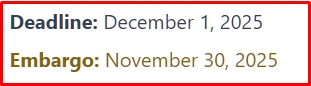
The Reason: The author has set an Embargo Date. This means reviews are not allowed to be posted until a specific date (usually Launch Day). This helps the author get a burst of reviews all at once to boost their ranking.
The Fix:
- Wait until the date shown on the countdown.
- As soon as that date hits, the form will unlock automatically!
2. The Campaign is “Restricted” (Too Late)
The Issue: You see a red or grey badge that says “Restricted” or “Closed,” and you cannot find the submission form.
The Reason: The Review Deadline has passed, and the extra Grace Period (usually 7 days) has also ended. The campaign is now officially closed.
The Fix:
- You can no longer submit the review through the dashboard.
- Please contact the author directly if you still wish to send them your review link to restore your reputation.
3. The “Overdue” Warning (Hurry Up!)
The Issue: You see an orange “⚠️ Overdue” badge, but the form is still there.
The Reason: You missed the official deadline, but you are currently in the Grace Period.
The Fix:
- Submit immediately! You can still submit your review without penalty, but you only have a few days left before the status changes to “Restricted.”
4. You Are Logged Out
The Issue: You are clicking the link in your email, but it keeps asking you to log in, or you don’t see your books.
The Reason: For security reasons, the system requires you to be logged in to verify who is submitting the review.
The Fix:
- Ensure you are logged in with the exact same email address you used to apply for the book. If you have multiple accounts, you might be logged into the wrong one.
5. Browser Cache Issues
The Issue: You know the Embargo date has passed, but the button is still locked.
The Fix:
- Try refreshing the page (Ctrl + R or Cmd + R).
- Clear your browser cache or try opening the dashboard in an “Incognito” or “Private” window.
Still Stuck?
If none of these solutions work, please reply to the author’s email for further assistance.
🎉 Congratulations!
You now have a complete set of documentation and marketing materials for RS ARC Manager. You are fully equipped to launch, support, and sell this plugin!