
Understanding the Reputation Score: Identifying Your Best Reviewers
One of the most powerful features of RS ARC Manager is the Reputation Score Engine. Instead of manually tracking who reviewed your last book and who “ghosted” you, the system automatically calculates a reliability score for every single applicant.
This guide explains how this score works and how to use it to build a high-quality launch team.
1. How the Score is Calculated
The system uses a simple but effective math formula to grade every user:
Score = (Total Reviews Submitted / Total Books Downloaded) × 100
- Total Books Downloaded: The number of times a user has been approved for a campaign and actually downloaded the file.
- Total Reviews Submitted: The number of times that user returned to their dashboard and submitted a review link.
Example:
- If User A downloaded 10 books and submitted 9 reviews, their score is 90%.
- If User B downloaded 10 books but only submitted 2 reviews, their score is 20%.
Note: The calculation logic looks at the user’s entire history across all your campaigns.
2. decoding the Labels (Who is Who?)
To make decision-making faster, the system assigns a text label alongside the percentage. Here is what they mean:
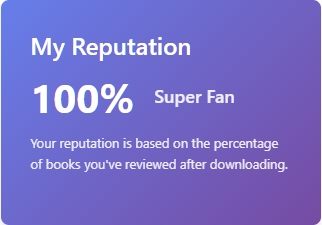
- 🏆 Super Fan (90% – 100%): These are your rockstars. They almost always leave a review. You should approve them immediately.
- 🌟 Reliable Reviewer (70% – 89%): Very trustworthy. They might miss a deadline occasionally, but they are generally solid assets to your team.
- 👍 Good Reviewer (50% – 69%): They review about half the time. Worth approving, but maybe send them an extra personal reminder.
- 😐 Average Reviewer (30% – 49%): Proceed with caution. They take more books than they review.
- 🚩 Bad User (1% – 29%): These are likely “freeloaders.” They frequently grab free books but rarely give anything in return. We recommend rejecting them or checking their excuse.
- 🆕 New User (0% or No History): This user has never downloaded a book from you before. They are a blank slate—give them a chance!
3. Where to See the Score
You can see the Reputation Score in two places:
- The Applicants List: In the main table under ARC Campaigns > Applicants. It appears right next to the user’s name/email.
- Applicant Details Modal: When you click “View Details,” the score is highlighted at the top of their profile card.
4. Strategy: How to Use This Data
- For High-Stakes Launches: If you have limited seats (e.g., only 50 copies available), prioritize Super Fans and Reliable Reviewers.
- For Growing Your Team: If you have unlimited digital copies, feel free to accept New Users to help them build their reputation.
- The “Ban” Decision: If you see a user with a score below 20% who applies again, you can use the Reject action. If they persist, consider deleting their user account from WordPress entirely.
Next Tutorial: [Manually Adding a Reviewer to a Campaign]